A Rust wipe is measured by what it brings back and how long they stay. Track four numbers per wipe: the wipe-day peak (and queue), how many players were new vs returning, the population on day 4 as a share of wipe day, and whether server FPS held up as the map filled. Compare each wipe with the last few on the same schedule, and you can tell whether a new wipe time, map size or schedule actually helped.
How Rust wipes work
- Forced wipe. On the first Thursday of each month Facepunch ships the monthly update. Recent forced wipes were Thursday 6 August and Thursday 3 September 2026; the next is Thursday 1 October 2026. Servers must update, and old saves do not carry over to the new version, so every map is wiped. The exact release time varies; most servers wipe as soon as the update is out.
- Map wipe. Deleting the save (or changing the seed or map size) gives everyone a fresh map. On community servers this is what "wipe" usually means.
- Blueprint wipe. Deleting the blueprints database resets everything players have learned. On forced-wipe day it is usually the owner's choice, unless Facepunch's update notes say otherwise. Many servers blueprint-wipe only on forced wipe; some never do.
- Schedules. Weekly (often Thursday, to line up with forced wipe), twice weekly on high-population servers, biweekly and monthly for longer games. The server name usually advertises it ("Wiped 03/09", "Weekly | Thu").
A wipe resets your population curve. There is a rush on wipe day, a strong weekend, and then a decline as groups get raided or bored. The shape of that decline is the most useful thing you can measure.
The numbers that describe a wipe
| Number | How to read it |
|---|---|
| Wipe-day peak | Your reach: how many players the wipe pulled in. Compare like with like (weekly wipe vs weekly wipe, forced vs forced). |
| Queue length and give-ups | If the queue fills and people leave it, you are turning players away. Raising slots may help if FPS allows. |
| New vs returning players | A wipe that only brings back regulars is healthy but not growing. New players are how the server grows. |
| Day-4 population | Players online at the same hour on day 4 (Monday after a Thursday wipe), as a share of wipe day. The best single measure of whether a wipe held. |
| Server FPS through the wipe | Entities pile up as bases grow. FPS that sinks by day 5 drives players off. See Rust server FPS. |
| Wipe-day store revenue | VIP or kit sales cluster on wipe day. Useful for spotting which wipes pay. |
"Day-4 retention" in Rust communities often means population on day 4 rather than the share of individual wipe-day players who returned. Both are worth knowing. Population is easy to read from a players-online chart. Per-player return needs player identities and join history.
Measuring with free tools
- Players online by hour. BattleMetrics shows public player-count history for most Rust servers, including your competitors'. That is a quick way to see how other servers' wipe days look and when their populations fall away.
serverinfoover RCON gives players, queued, joining, FPS and entity count at a point in time. A small script that logs it every minute to a CSV gives you a wipe-by-wipe record.- Logs. Connect lines carry the SteamID64. A first-seen table built from them separates new from returning players.
- A wipe diary. Write down the date, time, map seed and size, whether blueprints were wiped, and anything else you changed. Without it, every comparison is guesswork three weeks later.
Then, for each wipe, fill in one row: peak, peak queue, new players on wipe day, day-4 population at the same hour, FPS on day 1 and day 5. After four or five wipes the pattern is usually obvious.
Picking the best wipe time and schedule
- Wipe before your peak, not at it. Look at players online by hour for a normal week. Wiping two to three hours before your peak gives wipe-day players a whole evening on the fresh map. A wipe after your main region goes to bed starts the wipe with half your audience.
- Mind your regions. An EU server that wants NA players on wipe day must wipe in the European evening.
- Test one change at a time. Move the wipe time by an hour for three wipes, then compare peak and day-4 population with the three before. Change the map size in a different month.
- Schedule. If day-4 population is still high when you wipe, your wipes may be too frequent; if the server is empty by day 3 on a two-week wipe, try weekly.
- Blueprint wipes. Compare forced wipes with and without a BP wipe on new vs returning players and day-4 population. A BP wipe often brings back lapsed players but can push casual players away mid-month.
What ServerStats records around wipes
The ServerStats plugin for Oxide or Carbon ("Track wipes": true, on by default) detects wipes itself, with no RCON:
- Map wipes are detected when the seed, map size, map or save wipe ID changes, or a new save is created. Each one sends a
map_wipeevent and incrementsmap_wipes. wipe_age_daysgives how many days the current map has been running, so you can tell where in the wipe cycle any point on a chart falls.- Blueprint wipes (
blueprint_wipes) are detected with a heuristic: the player blueprints database shrinking from over 256 KB to under 64 KB. - Population and queue:
players_online,sleepers,max_players,queue_length,joining,queue_wait_s, and aqueue_leaveevent when someone gives up waiting. - Performance: server FPS, frame time, entity counts and save time, with lag spikes attributed to the plugin that caused them.
- Deaths carry the wipe day as a property, alongside raid, explosive and building counters.
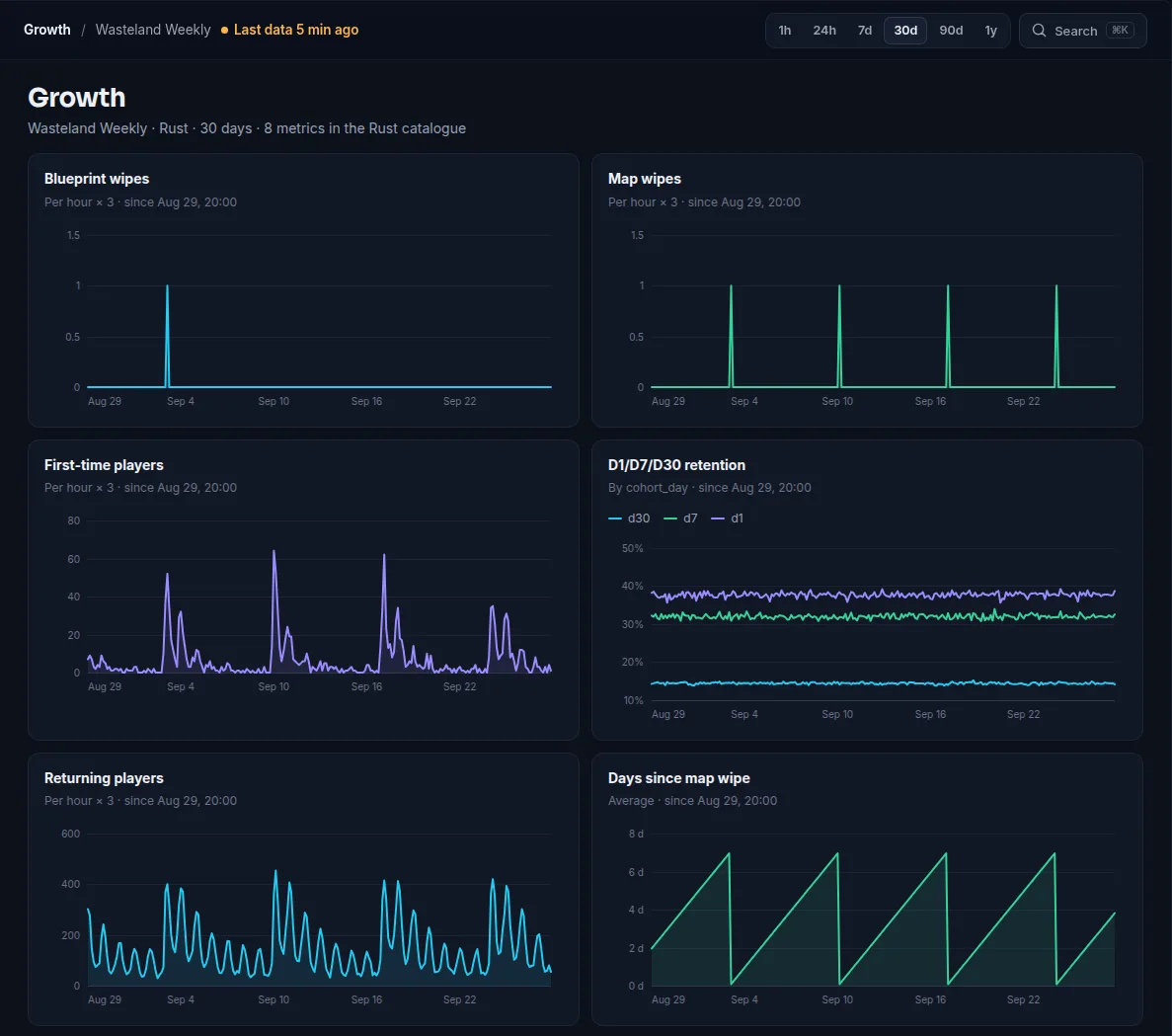
On the dashboard, the Growth page charts wipe age, map wipes and blueprint wipes next to players online, and the Players page lists every session. On Operator and up you also get weekly retention cohorts: with a Thursday wipe, each Monday-to-Sunday cohort contains one wipe day, so the cohort table becomes a wipe-by-wipe comparison of how many new players came back the following week. If you sell VIP or wipe kits, store revenue by day lines up with wipe days too.
Record your wipe schedule in server notes. On Network, you can query the data through MCP and give the schedule to your own AI client for context. The built-in Ask ServerStats assistant is coming soon.
There is no single side-by-side "compare wipes" view today. The comparison table above is still a manual step, but the numbers for each row are all recorded for you. Rust does not expose a join hostname or a player's country, so ServerStats does not report joins by region or by server list for Rust.
Summary
- Forced wipe is the first Thursday of each month; map wipes are mandatory then, blueprint wipes usually your choice.
- Judge each wipe on peak and queue, new vs returning players, day-4 population and FPS through the wipe.
- Wipe a few hours before your peak hour, and change one thing per few wipes.
- The ServerStats Rust plugin detects map and blueprint wipes itself and records wipe age, queue and performance, so each wipe can be compared with the last.
 Rust