ServerStats exposes read-only MCP tools to Network customers. Connect your own AI client, such as Claude Code, Claude Desktop or Cursor, to ask questions about your server analytics. The built-in Ask ServerStats assistant shown in the demo is coming soon; it is not enabled in production. MCP uses your client's model, so it does not depend on the built-in assistant.
MCP returns analytics within your plan's history and your role's permissions. Player identities are pseudonymous unless your organisation enables name display. The tools cannot perform moderation actions or change server settings.
Connecting Claude or Cursor with MCP
The Model Context Protocol lets an AI client call tools on a remote server. ServerStats runs one at https://serverstats.cc/api/v1/mcp (Streamable HTTP). It exposes the same read-only tools as the assistant, with the same pseudonymised output, and ServerStats makes no model call: your client's model does the thinking, so MCP uses none of your daily questions.
1. Create a token. Dashboard, Account, AI & MCP, API tokens. Name it, pick an expiry (30 days, 90 days, 1 year or never) and copy the ssk_… token; it is shown once. A token acts as you, with your role and your organisation's plan, works only on the MCP endpoint, and stops working as soon as it is revoked or you leave the organisation. Up to 10 active tokens per person per organisation.
2. Add it to your client. Replace ssk_… with your token.
Claude Code:
claude mcp add --transport http serverstats https://serverstats.cc/api/v1/mcp --header "Authorization: Bearer ssk_…"Check it with claude mcp list. Add --scope user to use it in every project.
Claude Desktop (Settings, Developer, Edit config, then restart Claude Desktop; needs Node.js):
{
  "mcpServers": {
    "serverstats": {
      "command": "npx",
      "args": ["-y", "mcp-remote", "https://serverstats.cc/api/v1/mcp", "--header", "Authorization:${AUTH}"],
      "env": { "AUTH": "Bearer ssk_…" }
    }
  }
}
The Authorization:${AUTH} form, with no space, avoids a Windows quoting problem.
Cursor (~/.cursor/mcp.json, or .cursor/mcp.json in a project):
{ "mcpServers": { "serverstats": { "url": "https://serverstats.cc/api/v1/mcp", "headers": { "Authorization": "Bearer ssk_…" } } } }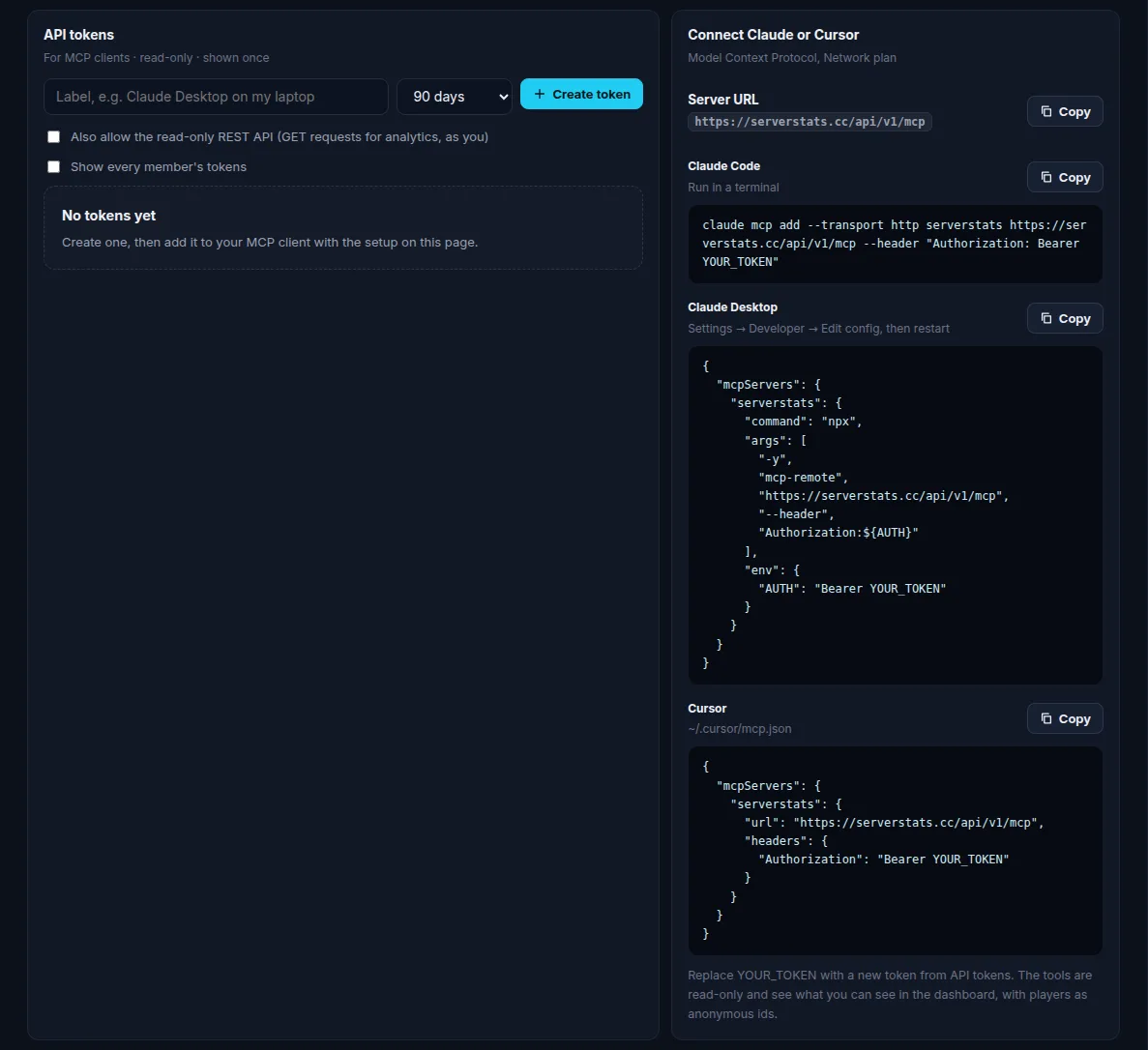
3. Ask. For example: "Using serverstats, what caused lag on my SMP this week?" The client calls list_servers first, then whichever tools it needs.
MCP tools and limits
| Tool | Returns |
|---|---|
list_servers | Every server, its game and status; your plan and history window |
server_overview | Players online, joins and playtime today, latest gauges such as TPS and memory |
list_metrics | Which metrics and events have data on a server |
get_timeseries | 1 to 4 metrics over a range: summary and up to 48 points each |
top_events | Most frequent event types in a range |
top_players | Most active players by playtime or sessions (pseudonymous) |
player_retention | Sessions, new and returning players, session length, D1/D7/D30 |
lag_spikes | Count, worst tick and top causes by plugin or resource |
store_revenue | Tebex, PayNow and CraftingStore revenue, packages, creator codes (Operator and up) |
basic_mode_status | Polling state, last answer and uptime for a basic-mode server |
get_server_notes | Your organisation's notes |
Time ranges are clamped to your plan's history, and the result says so. Rate limits: 30 requests burst then 1 per second per token, and 5,000 tool calls per organisation per UTC day. Every tool is marked read-only. Where the data goes after your client receives it is up to your client and its model provider.
Questions to try with your MCP client
Ask about a specific server and time range so the client can choose the smallest useful tool call. For example: "Using ServerStats, show the top lag-spike causes on Survival in the past seven days," or "Compare weekly retention for the last two cohorts on Hub." If the client needs to identify a server, it can call list_servers; if it needs to know which measurements exist, it can call list_metrics. Different game agents report different measurements, so a metric unavailable for one server is not necessarily an error.
MCP returns data and a model in your own client turns that data into prose. The client may infer a cause from coincident events, but the data alone does not prove causation. Check the actual timestamps and source measurements before acting on an incident claim. For financial questions, the store_revenue tool requires a plan with store analytics, and the results depend on your connected store and the time range selected.
Troubleshooting and privacy
If a client reports an authorization error, verify the token was copied in full, that its Authorization header starts with Bearer , that the token has not expired or been revoked, and that your organisation is on Network. A token is personal: it follows your role and stops working when you leave the organisation. Make a new token if you need a different scope; do not put it in a public repository or share one token across staff.
If a query comes back empty, confirm the server is sending data and that the requested time lies inside your plan's history. Network stores up to two years, but a newly connected server only has data from the time it started reporting unless you imported another supported data source. MCP can only return the measurements ServerStats actually received. For a local API issue, first check the dashboard's live server overview and the token's scope in Account, AI & MCP.
MCP is read-only on ServerStats's side. Your client still sends the returned data to whichever model provider you configured in that client, subject to that provider's settings. If you need to keep analytics within your own system, use the read-only REST API with an api:read token instead of a model client. Revoke either token immediately from the dashboard if it is exposed.