To get Discord alerts for a game server you need two things: a Discord webhook (a URL that posts into one channel) and a monitor that checks your server and calls that URL when something is wrong. The webhook takes a minute to create and needs no bot. The monitor is the part that decides whether you get useful alerts or a channel full of noise.
This guide covers both: creating the webhook, a free do-it-yourself monitor for simple up/down checks, and how to set up downtime, lag and player-drop alerts in ServerStats without spamming your staff.
What makes an alert worth sending
Before the steps, three rules that apply to any alert system:
- Alert on a state, not a reading. One slow tick is not an incident. "TPS below 18 for 5 minutes" or "3 lag spikes in 5 minutes" is.
- Send the recovery too. A "back online after 7 min" message closes the loop, so nobody has to check.
- Use a cooldown. A flapping server should not post every minute. Thirty minutes between repeats is a sane default.
Step 1: Create a webhook in your Discord channel
- In Discord, hover the channel you want alerts in (a private
#server-alertsfor staff works well) and click the gear icon to open Edit Channel. - Open Integrations, then Webhooks, and click New Webhook.
- Give it a name (for example "Server alerts") and click Copy Webhook URL.
The URL looks like https://discord.com/api/webhooks/<id>/<token>. Treat it like a password: anyone with it can post in that channel. If it leaks, delete the webhook and make a new one.
The free DIY option
If all you want is "tell me when the server stops answering", a cron job and curl will do. This checks a TCP port (Minecraft Java 25565 here) and posts when it fails:
#!/usr/bin/env bash
# check-server.sh: run from cron every minute on a machine OUTSIDE the server's network.
HOST=play.example.com
PORT=25565
WEBHOOK='https://discord.com/api/webhooks/ID/TOKEN'
STATE=/tmp/check-server.down

if nc -z -w 5 "$HOST" "$PORT"; then
  if [ -f "$STATE" ]; then
    rm "$STATE"
    curl -s -H 'Content-Type: application/json' -d "{\"content\": \"$HOST is back online\"}" "$WEBHOOK"
  fi
else
  if [ ! -f "$STATE" ]; then
    touch "$STATE"
    curl -s -H 'Content-Type: application/json' -d "{\"content\": \"$HOST:$PORT is not answering\"}" "$WEBHOOK"
  fi
fi
The state file stops it posting every minute. Its limits: nc -z only works for TCP games (Steam's A2S query is UDP, so an open-port check proves nothing there), it cannot see lag or player counts, and it alerts on a single failed check. For UDP games you need a real query; see the basic mode guide.
Step 2: Add the webhook as an alert channel
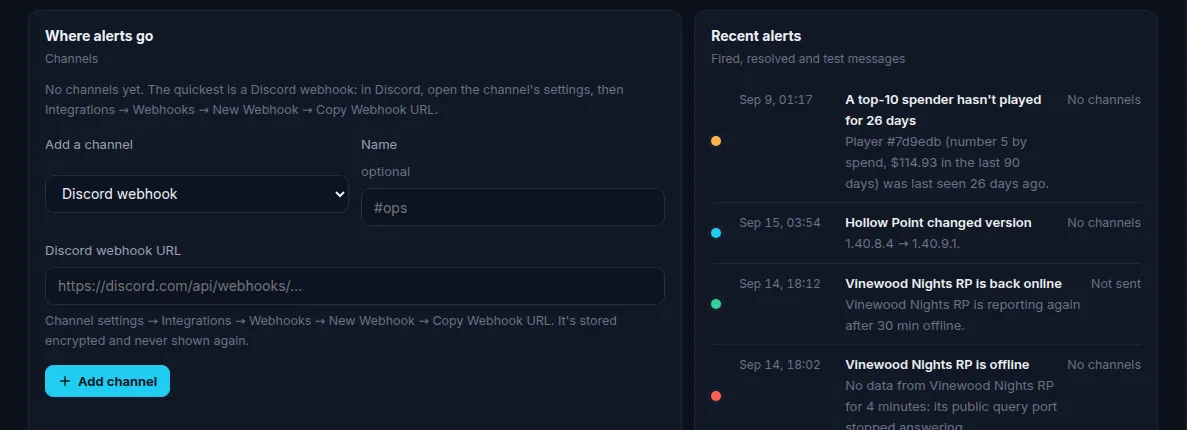
In the ServerStats dashboard, open Alerts, then Where alerts go, and add a Discord webhook channel. Paste the URL from step 1. ServerStats checks that it is a real Discord webhook URL and stores it encrypted.
Click Send test. A "Test message from ServerStats" should appear in the channel within seconds. If it does not, the webhook was probably deleted or the URL was copied incompletely.
Other channel types:
- Discord bot channel: coming soon. Today, use a channel webhook. See the Discord bot preview.
- Email: pick which members of your team get it.
- Signed webhook (Network): a POST to your own URL with a signing secret, for PagerDuty-style routing or your own tooling.
Step 3: Create the server offline rule
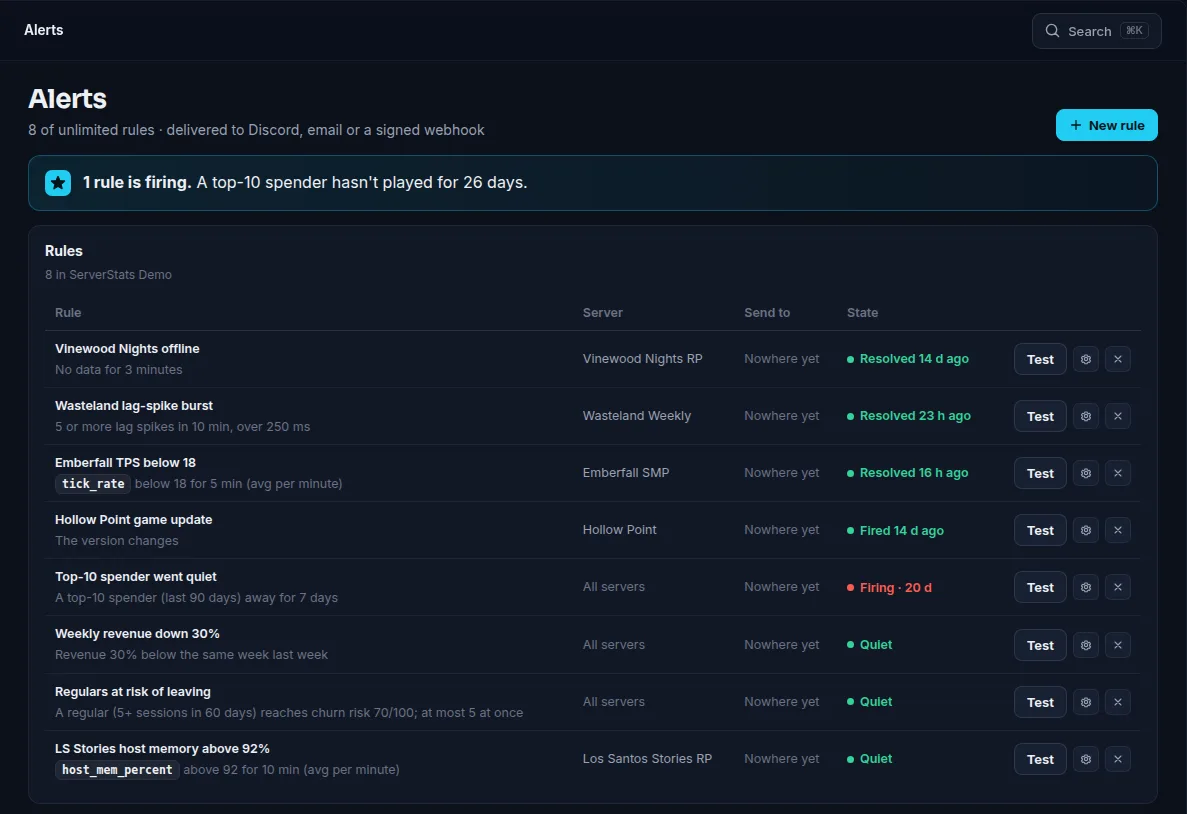
Add a rule of the kind Server offline. Pick the server, set how many minutes it must be silent before firing (default 5, minimum 2), and tick the Discord channel.
What "offline" means depends on how the server is connected:
- With the agent installed, it fires when the agent stops reporting.
- In basic mode (no install), it fires when the public query port stops answering. Basic mode polls every 60 seconds.
When the server comes back, you get a "back online" message with how long it was down, unless you turned recovery messages off.
Step 4: Add lag and player rules
Lag-spike burst. Fires when the agent records a number of lag spikes in a window (default 3 in 5 minutes, with an optional minimum spike length). The message includes the worst spike and, where the game supports attribution, the plugin or resource most often responsible. This needs the agent; basic mode cannot see lag.
Threshold. Fires when any metric stays above or below a value for N minutes (1 to 60, default 5), using the per-minute average, peak or minimum. Useful examples:
| Metric | Condition | Why |
|---|---|---|
| TPS (Minecraft) | below 18 for 5 min, average | Sustained lag, not one bad tick |
| Tick time / MSPT | above 50 ms for 5 min, average | Over the 50 ms budget at 20 TPS |
| Players online | below 1 for 30 min | The server is up but empty, often a broken join path |
| Memory | above your limit for 10 min, peak | Early warning before an out-of-memory crash |
The threshold rule tolerates one missing minute of data, so a brief gap does not reset it.
Version or map change. Posts once when the server's version or map changes. Handy for catching an unplanned host update, or for announcing a map rotation.
Plan-gated kinds:
- Churn risk (Operator): posts when a regular player's churn-risk score crosses a threshold (default 70 out of 100), at most 5 players at a time.
- Joins drop vs last week (Network): joins in the last hour against the same hour a week earlier, default a 40% drop.
- Revenue drops vs last week (Network): store revenue against the same period a week earlier.
- A top spender stops playing (Network): one of your top spenders has not played for N days.
Step 5: Test, then tune
Every rule has Send test, which delivers a clearly marked test through the same path as a real alert. Use it, then let the rules run for a week. Common adjustments:
- Too many lag alerts? Raise the spike count or set a minimum spike length, and fix the top cause the alert names.
- Offline alerts during scheduled restarts? Raise the minutes, or mute the rule during the restart window.
- Repeats while you are already fixing it? The default cooldown is 30 minutes; it can be set from 1 minute to 7 days.
Plan limits
| Free | Operator | Network | |
|---|---|---|---|
| Alert rules | 1 | 25 | Unlimited |
| Offline, threshold, lag-spike, version/map | Yes | Yes | Yes |
| Churn risk | No | Yes | Yes |
| Join drop, revenue drop, top spender left | No | No | Yes |
| Email and Discord webhook | Yes | Yes | Yes |
| Signed webhooks | No | No | Yes |
Most rules are checked every minute; join-drop every 5 minutes, revenue and top-spender every 15, churn risk hourly. If you downgrade, rules over the new limit pause rather than disappear. Full details are on the pricing page.
Summary
- A Discord webhook is all you need on the Discord side; no bot, no permissions.
- A cron script covers up/down for TCP games. For UDP games, lag and player drops you need a real monitor.
- Alert on sustained states with a cooldown, and always send recoveries.