Retention is the share of new players who come back. D1 retention is the share who return the day after their first session, D7 a week later and D30 a month later. You measure it per cohort, a group of players who first joined in the same week, so you can see whether the players who arrived after a change stay better than those who arrived before it.
Player counts tell you how busy the server is. Retention tells you whether it is getting healthier, because a server can hold a steady player count while replacing most of its players every week, and that costs you advertising money and community. This guide defines the numbers precisely, shows how to read a cohort table, and covers the levers that move them.
The definitions, precisely
"D7 retention" is used loosely, so decide on one definition and stick to it. These are the ones ServerStats uses:
- New player: someone whose first session on that server (or anywhere in your organisation, if you look org-wide) falls in the period. A player who first joined before your history window starts is not new.
- Weekly cohort: every new player whose first session starts in the same UTC week, Monday to Sunday.
- Day-n return (D1, D7, D30): a session that starts between n and n+1 days after the start of the player's first session. D1 is a join 24 to 48 hours after the first join; D7 is a join 7 to 8 days after.
- Eligible: a player only counts towards Dn once their first session is at least n+1 days old. A player who joined yesterday is not "lost" on D7; they are simply not measured yet.
- W1 to W7: the share of a cohort with at least one session in each later calendar week. W1 is the week after the cohort's week. A week's value appears only once that week has ended.
This is classic (or "exact day") retention. Some tools report rolling retention instead: the share who came back on day n or any later day. Rolling numbers are always higher, and they keep changing for weeks. Neither is wrong, but comparing your classic D7 with someone else's rolling D7 will make your server look worse than it is.
Note: Reconnects matter. A player who crashes and rejoins two minutes later has not "returned". Look for tools that count sessions by start time and treat short gaps as the same visit.
What healthy numbers look like
There is no trustworthy published benchmark for game-server retention. The widely quoted retention benchmarks come from mobile analytics companies and measure app installs, where the cost of trying a game is very different from typing a server address. Numbers also swing with genre: a Rust server that wipes weekly, a roleplay FiveM city with a whitelist and an anarchy Minecraft server keep players for different reasons.
What does work:
- Measure a baseline. Collect four to six weekly cohorts before changing anything. That gives you a normal range for D1, D7 and W1.
- Watch the shape, not one number. A cohort that drops from 100% to W1 and then flattens has found its regulars. A cohort that keeps sliding every week has not.
- Compare cohorts of similar size. A week with 40 new players can swing 10 points on noise alone. A week with 800 cannot. Treat small cohorts as a hint, not a verdict.
- Expect D1 to be the biggest drop. Most players who leave decide in their first session. That is also where you have the most control.
How to measure it without paid tools
If your server has player identities (a UUID, SteamID64 or similar) and join logs, you can compute retention yourself:
- Export joins as
player_id, join_timefrom your logs, a database plugin or a session table. - For each player, take their first join and assign it to a week.
- For D7, check whether the same player has a join between 7 and 8 days after that first one. Only count players whose first join is at least 8 days old.
- Divide returned players by eligible players, per week.
On Minecraft, Plan (Player Analytics) keeps join history you can query. On Source and Rust servers, the connect lines in your logs carry the SteamID64. A spreadsheet pivot is enough for a few hundred players a week. It gets painful when you want it per server, per week, every week.
A public query (A2S, Server List Ping) is not enough: it gives a player count, sometimes names, but no stable identity, so you cannot tell a returning player from a new one. This is why ServerStats basic mode shows players online but no retention.
How to read a cohort table
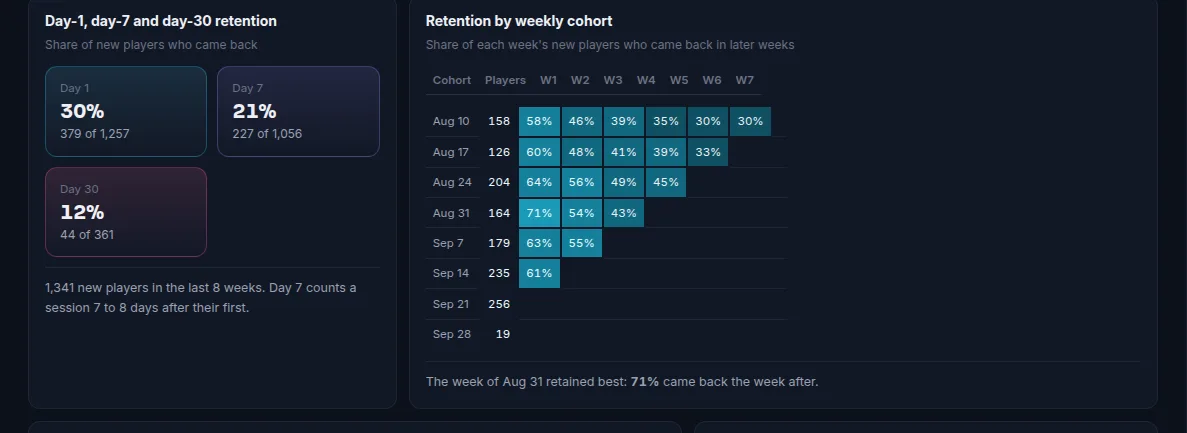
A cohort table has one row per week of new players and one column per week after. Read it three ways:
- Across a row: how one cohort decays. A row like 100, 34, 22, 19, 18 found about a fifth of its players as regulars. A row like 100, 34, 15, 8, 4 lost them slowly: look for what those players ran out of (content, a progression wall, a dead economy).
- Down a column: whether you are improving. If W1 goes 28, 29, 27, 36, 37 after you rebuilt spawn, the rebuild worked. Down-column is the comparison that answers "did my change help?".
- Along a diagonal: calendar effects. Cells on the same diagonal happened in the same calendar week. If every cohort dips on one diagonal, something happened that week to everyone: an outage, a bad update, a rival's launch or a wipe.
What moves retention
The first session
The first ten minutes decide D1. Check these in order:
- Lag in the first minutes. A new player's first impression includes chunk loading, rubber-banding and join lag. If your TPS, server FPS or tick time dips when several players join at once, fix that before anything else. See Minecraft TPS and MSPT and Rust server FPS.
- A readable spawn. One obvious path to the core loop (claim land, get a starter kit, join a job), not a hub with twenty NPCs.
- Time to first goal. How long until the player achieves something they care about? Track it as a custom event (
tutorial_done,first_claim) and compare the D1 of players who reached it with those who did not. - First-session length. Players whose first session is very short rarely return. Look at your session table for new players: if most leave within a few minutes, the problem is at the door, not in your endgame.
A reason to come back tomorrow
Daily rewards, a timed event, a build that finishes overnight, a friend who is online. D1 responds to anything that creates an appointment. D7 and W1 respond to weekly structure: events on a fixed night, a weekly wipe or season, leaderboards that reset.
Events and peak hours
Schedule events when your cohort is actually online. A players-online chart by hour of day shows when your audience plays; an event at 03:00 for your main timezone is an event for nobody.
Wipes and resets
On wipe-based games, retention has a rhythm: a spike of new and returning players on wipe day, then decay. Measure the cohort that joined on wipe day separately from mid-wipe joiners. The Rust wipe day analytics guide covers this.
Change one thing at a time
If you rebuild spawn, change the economy and add a new rank in the same week, the next cohort's W1 will tell you that something worked but not what. Stagger changes by a week or two and write down the date of each.
How ServerStats shows retention
ServerStats builds sessions from the join and leave events the agent sends, so retention works on every game with a full agent that identifies players. On Operator and Network plans the Players page has two panels:
- Day-1, day-7 and day-30 retention: the pooled rate across the last eight weekly cohorts, with how many new players that covers.
- Retention by weekly cohort: the W1 to W7 table above, with a sentence naming the week that retained best.
Cohorts are weekly (Monday UTC), exactly as defined above, per server or across your whole organisation. D30 needs 31 days of history, so it fills in during your first month; Operator keeps 90 days and Network two years. The weekly report also says what share of the previous week's new players returned. The same numbers are available through MCP on Network, and through the REST API (GET /orgs/<org>/insights/cohorts) on Network.
When a regular starts drifting away, churn risk picks them up individually, which is the other half of the retention picture.
Summary
- Retention is measured per weekly cohort of new players: D1, D7 and D30 are returns on exactly those days, counted only once a player is old enough to be measured.
- Read a cohort table down the columns to judge a change, and along the diagonals to spot calendar events.
- Build your own baseline; mobile benchmarks do not transfer to servers.
- The first session decides D1: fix join lag, spawn and time to first goal before anything else.
 Minecraft
 Rust
 FiveM
 Garry's Mod
 Hytale