To track Tebex revenue per package and per creator code, use two things: Tebex's own statistics page for store-level totals, and Tebex webhooks for anything that needs to join a sale with what the buyer does in game. Every Tebex payment webhook carries the products bought, the amount and currency, any coupons, the creator_code and the buyer's game ID (a Minecraft UUID or a SteamID64). That is enough to answer "which package pays", "which creator brings buyers" and "how much is a player-hour worth".
What Tebex shows you already
Start with what you have. Tebex's statistics pages (documented under Tebex control panel, Statistics) cover:
- total revenue and average payment value, with a revenue trend graph;
- revenue by game server, if you run several;
- most popular packages and top purchasing customers;
- purchase activity by hour and repeat purchase rate;
- coupon codes (revenue and number of uses);
- creator codes: revenue generated via each code and commission paid;
- gift cards, abandoned-cart recovery, subscriptions and referrals.
For "how much did we make and on what", that is enough. What Tebex cannot show is anything that happens on your server: how long buyers played before paying, whether they are still playing, which address or campaign brought them, or what your revenue is per hour of playtime. Tebex knows the checkout, not the game.
A note on creator codes themselves. Tebex's documentation at the time of writing says a creator's share is paid automatically to their Tebex Wallet, an additional 1% fee applies to payments that use a code, the payout is capped at 50% of a transaction, and funds settle after 30 working days by default. Check Tebex's current terms before you rely on these figures.
How Tebex webhooks work
In the Tebex creator panel, open Developers, Webhooks, Endpoints and add your endpoint URL. Tebex signs every delivery: the X-Signature header is an HMAC-SHA256, keyed with your webhook secret, of the SHA-256 hash of the raw body. When you add the endpoint, Tebex first sends a validation.webhook event that must be answered with the webhook's id, so the receiver has to be live (and know the secret) before you save.
The events that matter for revenue tracking:
| Event | What it means for your numbers |
|---|---|
payment.completed | A sale: one row per product line |
payment.declined | A failed checkout (worth counting, not revenue) |
payment.refunded | Reverse the sale |
payment.dispute.opened / payment.dispute.lost | A chargeback: reverse the sale |
payment.dispute.won | You won the dispute: restore the sale |
recurring-payment.started / recurring-payment.renewed | A subscription's first payment and each renewal |
Two things trip people up when building this themselves. Idempotency: Tebex retries deliveries, so key every row by transaction id and line, or you will double count. Reversals: treat refunds and chargebacks as negative rows against the original lines, not as edits, so that gross, net and refund rate all stay correct for any date range.
Numbers worth tracking
- Net revenue: payments minus refunds and chargebacks. Gross flatters you.
- Refund and chargeback rate: a rising chargeback rate costs fees and can put your payment account at risk. Watch it per package; one misleading package description often explains most of it.
- ARPPU: net revenue per paying player. ARPU: per active player.
- Paying share and conversion: what share of players ever buy, and how long after their first join.
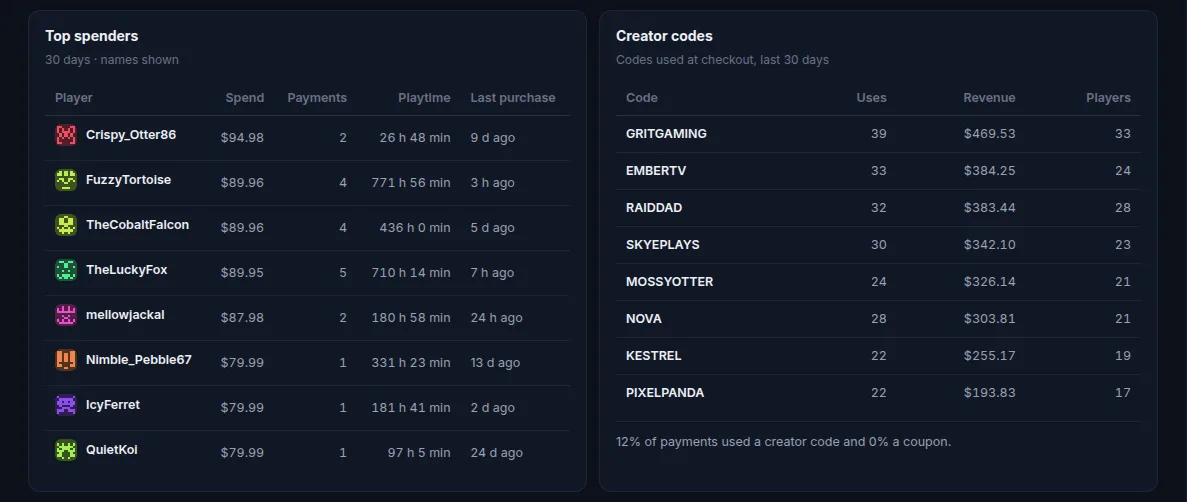
- Revenue per creator code: uses, net revenue and number of distinct buyers per code. Revenue is not return on investment; if you pay creators a fee on top, divide by that yourself.
- Revenue per player-hour: net revenue divided by hours played in the same period. It lets you compare servers of different sizes and see whether a busy month was also a lucrative one.
- LTV by source: what the players who arrived through one address or campaign have paid so far.
How ServerStats tracks Tebex revenue
For the exact connection steps, see the Tebex integration. If you use another store, the PayNow and CraftingStore pages explain their different webhook and accounting limits.
ServerStats receives Tebex, PayNow and CraftingStore webhooks on its own endpoint (/ingest/v1/store/tebex/<id> and the equivalents), checks each signature, and stores one row per product line. Refunds and chargebacks are stored as reversals, a won dispute restores the sale, and repeated deliveries are ignored. Amounts are converted to your organisation's currency at the rate for the purchase day.
The buyer's game ID is hashed into the same pseudonymous player ID your agent uses, so a purchase lands on the right player without ServerStats storing the raw ID. Buyer emails, names, IPs and addresses in the payload are never read.
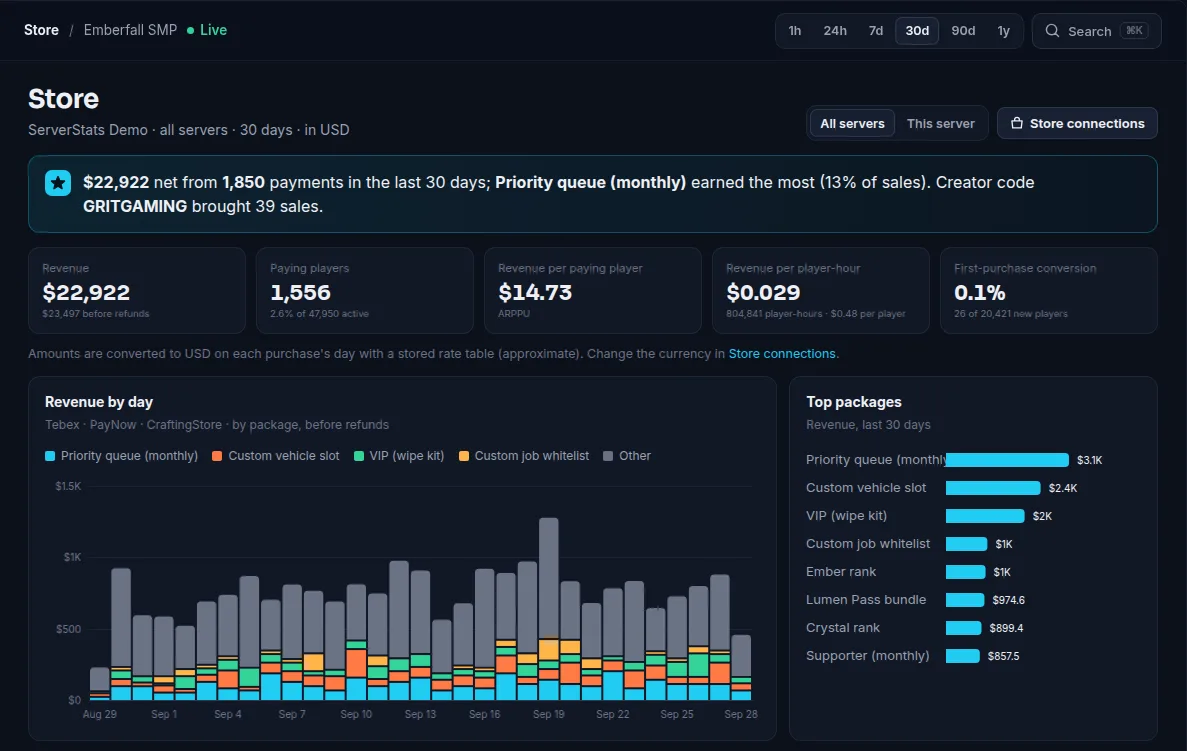
On Operator and Network, the Store page shows:
- gross, refunded, chargeback and net revenue, recurring revenue, refund and chargeback rates;
- ARPU, ARPPU, paying share, average order, first-purchase conversion and median time to first purchase;
- revenue per player-hour;
- revenue over time, stacked by top package;
- breakdowns by package, server, creator code, store provider and currency;
- top spenders with their playtime;
- lifetime value by source: new players grouped by the hostname they first joined with, with payers, revenue and revenue per new player.
Webhooks are received and stored on every plan, including Free, so nothing is lost if you upgrade later. On Operator and up you can also import past Tebex payments (up to 90 days back) with a game server secret key from the Tebex panel; the import only takes payments older than your first webhook, so nothing is counted twice.
Things to know before you connect
- Matching buyers to players needs the store's player ID to be the same ID the game uses: Minecraft Java and Hytale UUIDs, or SteamID64 on Steam games. Offline-mode usernames stay unlinked. FiveM matches only when the resource is set to the Cfx ID type (
serverstats_id_type fivem). Bedrock purchases are not matched to players today. - Join source (the hostname a player typed) exists only on Minecraft Java, Velocity and Hytale, so LTV by source is most useful there. See growing a Minecraft server with data.
- PayNow sends orders, refunds and chargebacks; its payments arrive without a creator code. CraftingStore sends payments only, using a payload template ServerStats gives you; include its
{referred_by}placeholder to get creator codes.
Store data joins everything else: churn risk raises a paying player's score once they stop buying, and Network plans add revenue-drop and whale-left alerts.
Summary
- Tebex's statistics cover store totals, packages, coupons and creator code revenue and commission.
- Webhooks carry package, amount, currency, creator code and the buyer's game ID; use them to join sales with play.
- Track net revenue, refund and chargeback rates, ARPPU and revenue per player-hour, not just gross.
- ServerStats records Tebex, PayNow and CraftingStore webhooks on every plan and analyses them on Operator and up.
 Minecraft
 Rust
 FiveM
 Hytale
 Garry's Mod
 Unturned