Churn is players leaving. On a game server that means regulars who stop logging in, and the useful question is not "how many left last month" but "who is leaving right now". A player who normally joins every other evening and has not been seen for nine days is a clear warning sign; a player who plays every Saturday and was last seen five days ago is not. The trick is to judge each player against their own rhythm.
This guide explains churn versus retention, the reasons players leave, how to spot at-risk players with free tools, and how the ServerStats churn-risk score works.
Churn vs retention
The two measure the same loss from different ends:
- Retention follows a cohort of new players forward: of the players who first joined this week, how many came back on day 7? It answers "is my first impression working?". See D1, D7 and D30 retention.
- Churn looks at players you already have: of the people who played regularly last month, who has stopped? It answers "am I losing my community?".
A server can have good D1 retention and still bleed regulars at month two or three, when players run out of goals. The reverse happens too: a tight community with a weak first impression. You need both views.
Monthly churn in its simplest form is players active last month who were not active this month, divided by players active last month. It is easy to compute and nearly useless to act on: by the time the monthly number moves, those players have been gone for weeks.
Why players leave a Minecraft server
From running servers and reading plenty of "why I quit" threads, the reasons cluster:
- Performance. Lag during the moments that matter (fights, farms, events) wears people down. A TPS dip every evening at peak is a churn cause hiding in a performance chart. See finding the plugin behind low TPS.
- Nothing left to do. Players who finish the progression, max their rank or complete their base lose the reason to log in. This shows up as playtime falling over weeks before they stop entirely.
- The economy. Runaway inflation makes new players irrelevant and old ones bored. Watch your money supply if you run Vault.
- Social ties. Players leave in groups. When a town, faction or friend group goes quiet, the rest follow.
- Staff and rules. A contested ban, an abusive staff member or a rule change that hurts one playstyle.
- Updates and resets. A new Minecraft version your plugins do not support yet, or a reset that erases progress players cared about.
Notice that most of these produce a gradual signal before the player stops: shorter sessions, longer gaps between them. That is what you can catch.
Spotting at-risk players with free tools
On a small server you can do this by hand. You need, per player, their join history for the last two months:
- Plan (Player Analytics) records sessions and shows each player's activity, including an "activity index" that weighs recent playtime. It is a good free starting point on Paper and Velocity.
- Your own logs. Join and quit lines in
logs/latest.log(and the gzipped older logs) carry the player name and time. A script can turn them into sessions.
Then, for each regular (say three or more sessions in 60 days):
- Work out their usual gap: the median time between the starts of their sessions.
- Compare it with time since last seen. Away for less than their usual gap: normal. Two or three times their gap: worth a look. Four times or more: they are probably leaving.
- Compare their playtime in the last two weeks with the two weeks before. A sharp drop often comes before the gap.
Using a player's own gap matters. A fixed rule like "inactive for 7 days" flags every weekend player every week and misses the daily player who has been gone for four days.
What to do about at-risk players
A score is only useful if someone acts on it. What works, roughly in order of effort:
- Look for a shared cause. If ten regulars went quiet in the same week, check what changed that week (an update, a lag spike pattern, a staff incident) before contacting anyone.
- Look at the group. Are the at-risk players in the same town, team or faction? A group leaving is a social problem; one player leaving is often just life.
- Give them a reason. A new season, an event on their usual night, content aimed at the endgame.
- Ask. A short, personal message from a staff member ("haven't seen you in a while, anything we could do better?") gets honest answers. Keep it rare and genuine; a bot that DMs everyone who misses a day is worse than nothing.
- Fix what they tell you. Then watch whether the at-risk list shrinks over the next few weeks.
How ServerStats scores churn risk
ServerStats gives every regular a churn-risk score from 0 to 100. It is a transparent heuristic, not a black-box prediction, so each score comes with the reasons behind it. It is built from three parts:
| Part | Points | How it is measured |
|---|---|---|
| Recency | 0 to 55 | Time since the player was last seen, against their own median gap between sessions (gaps under 30 minutes count as reconnects). At or under the usual gap: 0. Four times the usual gap or more: 55. A usual gap under 12 hours is treated as 12 hours. With no rhythm yet, a week is the yardstick. |
| Playtime trend | 0 to 25 | Playtime in the last 14 days against the 14 days before (when the earlier fortnight had at least an hour). A drop of 20% or less counts for nothing; stopping completely counts 25. |
| Spend | -15 to +15 | A paying player whose last purchase was over 30 days ago adds 10, over 60 days adds 15. A purchase in the last 14 days subtracts 15. |
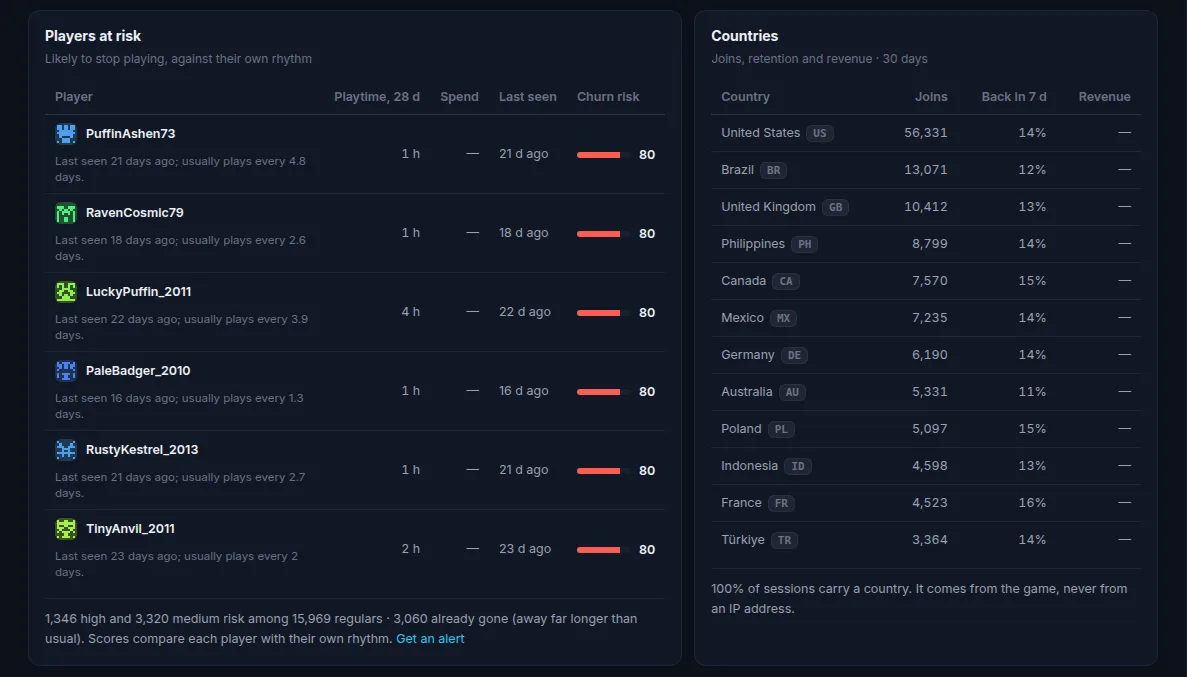
Scores of 70 and above are high, 40 to 69 medium. Only players with at least three sessions in the 60-day lookback are scored, because a rhythm needs a few sessions. Players who have been away more than 30 days, or more than eight times their usual gap, are counted as already gone rather than listed as at risk.
Where you see it, on Operator and Network plans:
- Players at risk on the Overview and Players pages: the riskiest regulars, with 28-day playtime, spend, last seen and a one-line reason such as "Last seen 9 days ago; usually plays every 2 days."
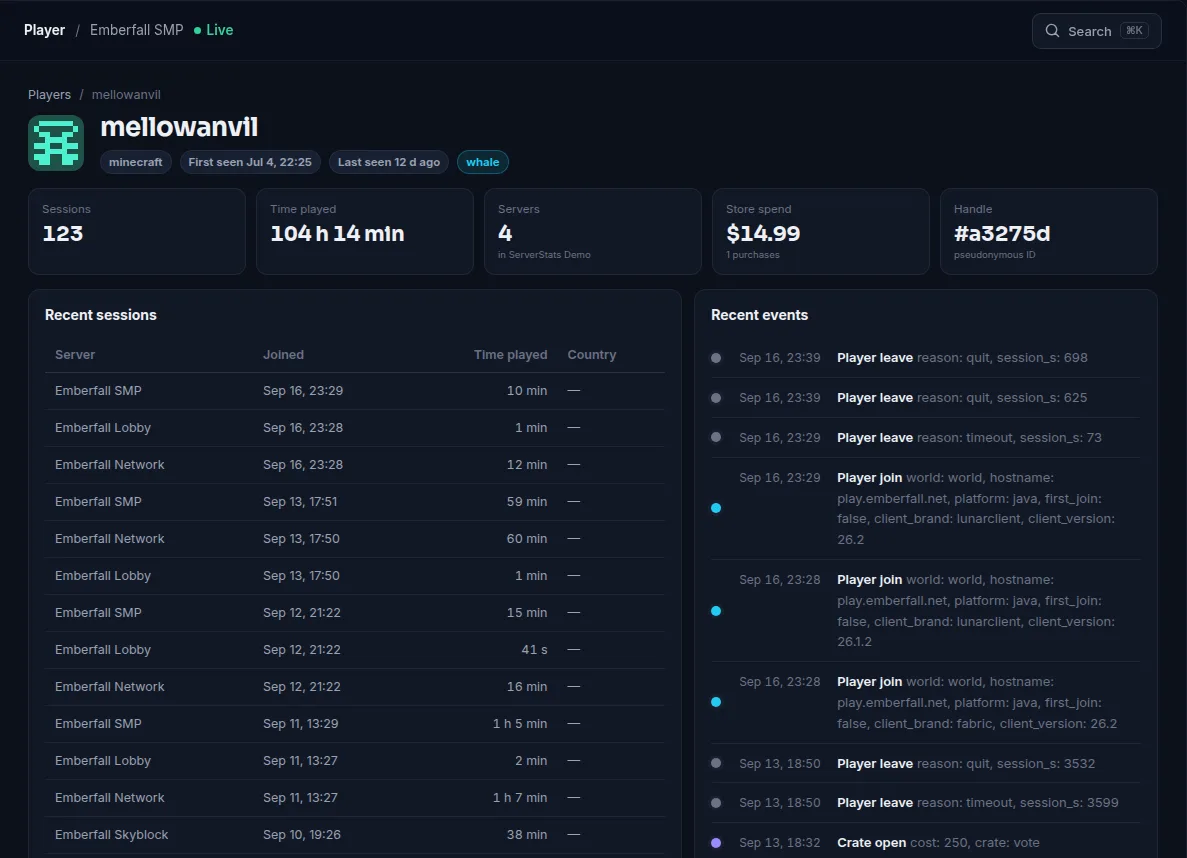
- Churn risk on each player profile: the score, the band, the usual gap and each reason with its points.
Churn-risk alerts
You can also get a churn_risk alert by email or in Discord (Operator and up). The rule takes a minimum score (default 70), a minimum number of sessions (default 5), a lookback (default 60 days), an optional minimum spend, and the most players to report at once (default 5). It is checked hourly and resolves when the player's score falls 15 points below the threshold, usually because they came back. Alerts name players by a short pseudonymous handle, never by IP address. See Discord alerts for setting up a channel.
Churn risk works on any game where the agent identifies players and records sessions: Minecraft Java (Paper, Purpur, Velocity), modded Minecraft, Hytale, Rust, FiveM and most others with a full agent. It does not work in basic mode, which sees player counts but not identities.
Summary
- Retention watches new players; churn watches the regulars you already have.
- Most players drift before they leave: longer gaps and shorter sessions. Judge each player against their own rhythm.
- Look for shared causes first (lag, updates, a group leaving) before reaching out to individuals.
- ServerStats scores every regular 0 to 100 from recency, playtime trend and spend, and says why.
 Minecraft
 Modded Minecraft
 Hytale
 Rust
 FiveM