To install ServerStats on a Hytale server, put ServerStats-Hytale-1.1.0.jar in the server's mods/ folder, start the server once, then claim it with the one-time code from the dashboard: /serverstats claim SS-XXXX-XXXX-XXXX in the console. The plugin tracks TPS and tick time per world against Hytale's 30 TPS budget, sessions and gameplay, and names the mod behind each lag spike. It only connects out over HTTPS.
Step 1: Check the requirements
- A Hytale dedicated server you can start and stop, with access to its console. The plugin was built and tested against the official Hytale server API 0.6.8.
- Java 25, which the Hytale server already needs.
- Outbound HTTPS (TCP 443) to
serverstats.cc. Players still connect to your server's usual port as before; the plugin opens nothing. - A ServerStats account. The Free plan covers one server; see pricing.
Step 2: Download the plugin
Download ServerStats-Hytale-1.1.0.jar. On a Linux host:
cd /path/to/hytale-server/mods
curl -fLo ServerStats-Hytale-1.1.0.jar "https://serverstats.cc/downloads/hytale/ServerStats-Hytale-1.1.0.jar"
curl -fLO https://serverstats.cc/downloads/hytale/SHA256SUMS
sha256sum -c SHA256SUMS
On a hosted panel, upload the jar to mods/ with the file manager.
Step 3: Put the jar in mods/ and start once
With the jar in mods/, start (or restart) the server. The plugin:
- writes
mods/ServerStats_ServerStats/config.yml; - generates its own Ed25519 key pair in
agent.key(mode0600) in that folder.
You'll see Skipping pack at ServerStats_ServerStats: missing or invalid manifest.json once in the log. That's Hytale's asset loader scanning every folder in mods/, including the plugin's data folder; it's harmless.
Step 4: Create a claim code in the dashboard
In the dashboard, open Servers & agents and click Add a server. Pick Hytale, give the server a name, and the Install step shows your claim code, SS-XXXX-XXXX-XXXX, with the download button and a config snippet.
The code works once and expires after 30 minutes. The plugin uses it one time to register its public key; after that, every batch is signed with its private key and there's no shared secret on your server or ours.
Step 5: Claim the server
In the server console:
/serverstats claim SS-XXXX-XXXX-XXXXOr put the code in the config and restart:
# mods/ServerStats_ServerStats/config.yml
claim-code: "SS-XXXX-XXXX-XXXX"   # one-time; blanked after the claim
server-name: "survival"           # your label for this server
moderation: false                 # dashboard kick/ban/mute/message; off by default
profiler:
  tick-budget-ms: 33              # Hytale default: 30 TPS
  lag-spike-ms: 67                # two missed ticks
After a successful claim the plugin blanks claim-code, writes enrolled: true and prints the key fingerprint (SHA256:...). The dashboard shows the same fingerprint in the server's settings.
The file has the same keys as the Minecraft plugin's: endpoint, moderation-console-commands, acquisition.track-hostnames (which address players typed, sent without the port; IP literals become direct_ip), privacy.send-player-names (stored encrypted), metrics.deep (opt-in higher-volume metrics), and the profiler, batch and buffer blocks. The commands only work for operators.
Step 6: Check that data is arriving
/serverstats(or /ss, or /serverstats status). It shows enrolment, the link state, the offline buffer, moderation, and the plugin's own cost and profiler overhead per world. In the dashboard wizard, the First data checklist ticks off Agent enrolled with its own key, First batch received and First readings stored; batches go out every 10 seconds.
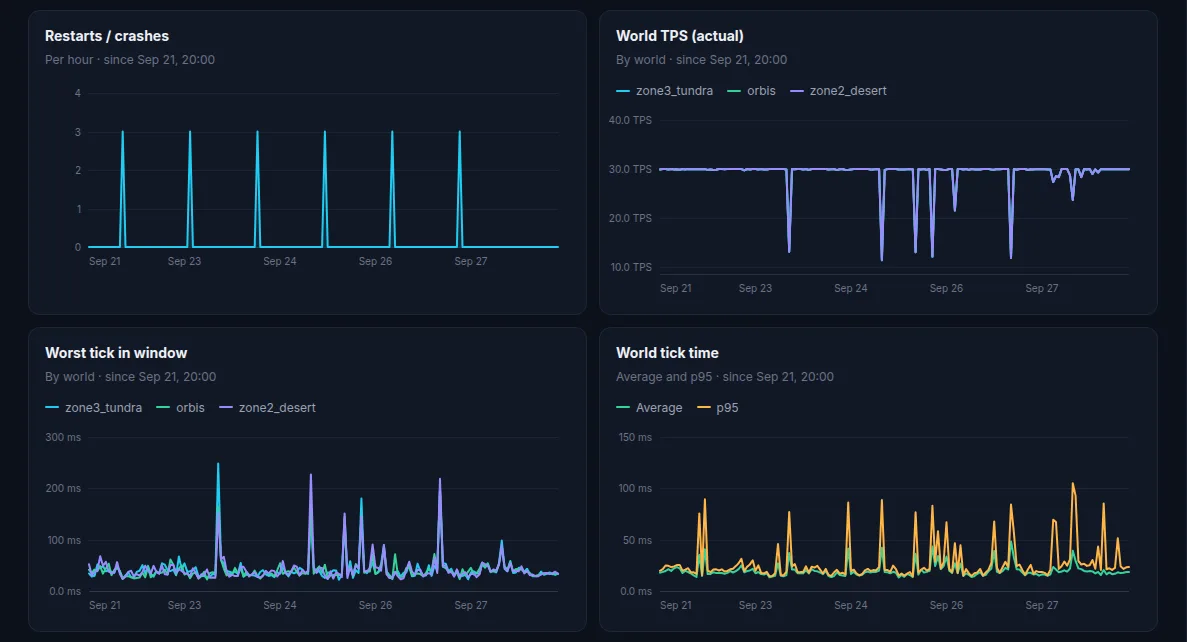
What you get:
- Per-world engine health: TPS, tick time and worst tick against the 33 ms budget, chunks, entities, NPCs, JVM heap and GC. Hytale runs each world on its own thread, so every world is measured separately.
- Lag spikes named by mod: when a tick passes 33 ms the plugin samples that world's thread and charges the time to the innermost mod on the stack (or to a server area such as
server:npcsorserver:worldgen). A tick over 67 ms becomes a lag spike event, at most one per minute per world. Up to 8 worlds are profiled. - Players: sessions, joins and quits by reason, ping, playtime per world, instances and world transfers, which feed retention.
- Gameplay: deaths by cause, PvP and NPC kills, blocks broken and placed, crafts, zones discovered, portals and instances.
On an idle test server the plugin's world-thread cost averaged 0.28 microseconds per tick. With debug: true, /serverstats also shows each handler's cost on your own server.
Verify your download
Every release is signed. SHA256SUMS lists the hash of each published file and SHA256SUMS.sig is its Ed25519 signature, made with the ServerStats release key. To check the signature and your copy of ServerStats-Hytale-1.1.0.jar:
curl -fLO https://serverstats.cc/downloads/release-signing-key.pub.pem
curl -fLO https://serverstats.cc/downloads/SHA256SUMS
curl -fLO https://serverstats.cc/downloads/SHA256SUMS.sig
openssl pkeyutl -verify -pubin -inkey release-signing-key.pub.pem -rawin -in SHA256SUMS -sigfile SHA256SUMS.sig
grep " hytale/ServerStats-Hytale-1.1.0.jar$" SHA256SUMS
sha256sum ServerStats-Hytale-1.1.0.jar
The first command prints Signature Verified Successfully; the last two hashes must be identical.
Troubleshooting
- Link errors or nothing sent: outbound HTTPS is blocked. Test with
curl -sI https://serverstats.ccfrom the host and allow TCP 443 out; ask your host if they filter outbound traffic. While offline the plugin buffers batches on disk (50 MB by default, 7 days at most) and sends them oldest first when the link returns. - The plugin doesn't load: check the startup log for a ServerStats error. The Hytale API is pre-1.0 and changes between releases; optional features (NPCs, portals, instances) are skipped with one warning if a server build lacks them, and the rest keeps working. If the whole plugin fails after a Hytale update, look for a newer ServerStats build on the Hytale page.
- Invalid code: check for a typo in
SS-XXXX-XXXX-XXXX. - Expired or already used: codes last 30 minutes and work once. Open the server's settings in the dashboard, click New claim code, and run
/serverstats claimagain. A new claim generates a new key, and the old key stops working. - The wizard keeps waiting: if you used
config.yml, restart the server after saving it.
Updating and uninstalling
Update: stop the server, replace the jar in mods/ (remove the old one so only one copy loads), start again. There's no ServerStats reload command; Hytale's own plugin reload runs the plugin's shutdown and setup again. Keep mods/ServerStats_ServerStats/: it holds agent.key and agent-state.json, so the server stays enrolled.
Uninstall: stop the server, delete the jar and the mods/ServerStats_ServerStats/ folder, then click Remove server… in the server's settings in the dashboard. Data from that agent stops being accepted at once.
What the plugin sends
Counters and timings for the server, worlds and gameplay, plus sessions. It never sends chat or sign text, command arguments, free-text kick or disconnect reasons, or IP addresses; chat is only counted with a length bucket, and commands are reduced to their root label. Player UUIDs travel over TLS only and are replaced with a keyed hash at ingest, a pseudonymous ID. See the security page. Running Minecraft too? The same agent core powers the Paper and Velocity plugin.
 Hytale