To install ServerStats on a Minecraft Java server, drop ServerStats-Paper-1.1.2.jar into plugins/ on Paper, Purpur or Folia (or ServerStats-Velocity-1.1.0.jar on a Velocity proxy), start the server once, then claim it with the one-time code from the dashboard: serverstats claim SS-XXXX-XXXX-XXXX in the console. The whole thing takes a few minutes and needs no open ports, because the agent only connects out over HTTPS.
This guide covers the exact files, config keys and commands, how to confirm it is working, and what to do when it isn't.
Step 1: Check the requirements
- Backend servers: Paper, Purpur or Folia, Minecraft 1.21.4 or newer, or 26.x. The plugin uses Paper-only APIs, so plain Spigot/CraftBukkit will not load it.
- Java: 21 or newer (whatever your Paper build already needs).
- Proxy (optional): Velocity. BungeeCord and Waterfall are not supported.
- Network: outbound HTTPS (TCP 443) to
serverstats.cc. Nothing needs to connect in, so you open no ports. - Access: console access, or an in-game account with the
serverstats.adminpermission (ops have it by default). - A ServerStats account. The Free plan covers one server; a Velocity proxy and each backend count as separate servers (see pricing).
Step 2: Download the plugin
| Platform | File |
|---|---|
| Paper, Purpur, Folia | ServerStats-Paper-1.1.2.jar |
| Velocity proxy | ServerStats-Velocity-1.1.0.jar |
On a Linux host you can fetch and verify it from the server folder:
cd plugins
curl -fLo ServerStats-Paper-1.1.2.jar "https://serverstats.cc/downloads/minecraft/ServerStats-Paper-1.1.2.jar"
curl -fLO https://serverstats.cc/downloads/minecraft/SHA256SUMS
sha256sum -c --ignore-missing SHA256SUMS
Host panels (Pterodactyl, Multicraft and the like) work the same way: upload the jar to plugins/ through the file manager.
Step 3: Install the jar and start the server once
Put the jar in plugins/ and start (or restart) the server. On first start the plugin:
- writes its config:
plugins/ServerStats/config.ymlon Paper, Purpur and Folia,plugins/serverstats/config.ymlon Velocity; - generates its own Ed25519 key pair in
agent.key(file mode0600) in that folder.
Don't use /reload or a plugin manager to hot-load it; a normal restart is the safe path.
Step 4: Create a claim code in the dashboard
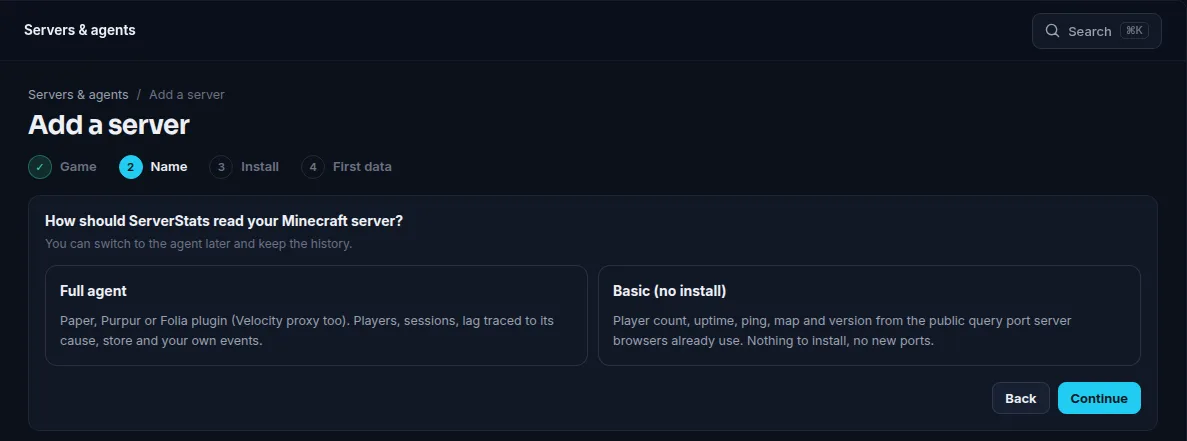
In the dashboard, open Servers & agents and click Add a server. The wizard has four steps: Game, Name, Install and First data. Pick Minecraft, give the server a name (for example survival or lobby), and the Install step shows your claim code: SS-XXXX-XXXX-XXXX.
The code works once and expires after 30 minutes. It is not a password: the agent uses it one time to register its own public key, and from then on every batch it sends is signed with its private key. No reusable secret is stored on your server or ours.
Step 5: Claim the server
Either way works. The console command is quicker:
serverstats claim SS-XXXX-XXXX-XXXXIn game, as an op, the same command is /serverstats claim SS-XXXX-XXXX-XXXX (alias /sstats). Or edit the config and restart:
# plugins/ServerStats/config.yml   (Velocity: plugins/serverstats/config.yml)
claim-code: "SS-XXXX-XXXX-XXXX"   # one-time; blanked after the claim
server-name: "survival"           # your label for this server
moderation: false                 # dashboard kick/ban/mute; off by default
After a successful claim the plugin blanks claim-code, sets enrolled: true and prints the key fingerprint (SHA256:...). The dashboard shows the same fingerprint under the server's settings, so you can check they match.
Other keys you may want later: privacy.send-player-names (names are stored encrypted and only shown if your team turns name display on), acquisition.track-hostnames (which address players typed, such as play. versus yt.), metrics.deep (opt-in high-volume metrics) and the profiler block (lag-spike-ms: 100, tick-budget-ms: 50). Run serverstats reload after editing.
Step 6: Check that data is arriving
Run:
serverstats statusIt shows enrolment, the link state, the last send, the offline buffer, moderation state, and the plugin's own main-thread cost and profiler overhead. Back in the wizard, the First data checklist ticks off Agent enrolled with its own key, First batch received and First readings stored. Batches go out every 10 seconds, so the first numbers usually appear within a minute.
On Paper and Purpur you then get TPS and MSPT against the 50 ms tick budget, and every tick over 100 ms captured and named by plugin (see the lag guide). On Folia the profiler and per-tick lag spikes are off, because Folia has no single main thread; you get per-region TPS instead.
Chart events from another plugin
A Paper, Purpur, Folia or Velocity plugin can add the ServerStats jar as a provided or compileOnly dependency and call its Java API after an action succeeds:
ServerStats.get().trackFrom("CratesPlus", "crate_open", player,
    Map.of("crate", "legendary", "cost", 3));
trackFrom attaches plugin:cratesplus to the event. In Custom tracking, choose Make chart, then use Event source if several plugins send crate_open. The plugin name comes from your plugin descriptor; invalid names leave the event without a source. Add softdepend: [ServerStats] on Paper, and see the custom plugin chart guide for property rules and chart examples.
Velocity networks
Install the Paper plugin on each backend and the Velocity plugin on the proxy, each with its own claim code (create one server per jar in the dashboard). The proxy reports what only it can see: players per backend, transfers between backends, backend kicks, failed connects and proxy-side ping. Gameplay and tick stats come from the backends. Moderation on Velocity supports kick, warn and message; bans and mutes run on the backends.
Fabric, NeoForge and Bedrock
- Fabric or NeoForge (Minecraft 26.2): use the modded agent. Drop the jar into
mods/on the server only, then claim with/serverstats claimorclaim-codeinconfig/serverstats.yml. Downloads and details: Minecraft modded. - Bedrock Dedicated Server: the agent is an Endstone 0.11 plugin (a
.whlinplugins/, config inplugins/serverstats/config.toml). See Minecraft Bedrock. If you run a Java network with Geyser, you don't need it: the Paper plugin tags Bedrock players through Floodgate.
Verify your download
Every release is signed. SHA256SUMS lists the hash of each published file and SHA256SUMS.sig is its Ed25519 signature, made with the ServerStats release key. To check the signature and your copy of ServerStats-Paper-1.1.2.jar:
curl -fLO https://serverstats.cc/downloads/release-signing-key.pub.pem
curl -fLO https://serverstats.cc/downloads/SHA256SUMS
curl -fLO https://serverstats.cc/downloads/SHA256SUMS.sig
openssl pkeyutl -verify -pubin -inkey release-signing-key.pub.pem -rawin -in SHA256SUMS -sigfile SHA256SUMS.sig
grep " minecraft/ServerStats-Paper-1.1.2.jar$" SHA256SUMS
sha256sum ServerStats-Paper-1.1.2.jar
The first command prints Signature Verified Successfully; the last two hashes must be identical.
Troubleshooting
- Nothing in
serverstats statusafter the claim, or "link" errors: the host is blocking outbound HTTPS. Test from the machine withcurl -sI https://serverstats.ccand allow TCP 443 out. Some hosts filter outbound traffic by default; their support can allow it. While offline the agent keeps up to 50 MB of batches on disk (7 days at most) and sends them when the link returns. - "Invalid" claim code: check you copied all of
SS-XXXX-XXXX-XXXX(a typo is the usual cause) and that you are using the code of the server you created for this jar. The code decides which dashboard server the agent becomes, so use one code per jar. - "Expired" or "already used": codes last 30 minutes and work once. Open the server's settings in the dashboard, click New claim code and claim again.
- The wizard still says waiting: make sure the server was restarted after you put the code in
config.yml, and look for a ServerStats line in the console. - The key was rejected after moving hosts: a new claim replaces the key, and the old install stops being accepted. The agent keeps buffering and re-checks every 10 minutes; claiming again with a fresh code resumes it.
- Folia shows no lag spikes: expected, see Step 6.
Updating and uninstalling
Update: stop the server, replace the jar in plugins/ (delete the old file so you don't load two copies), start again. Keep the plugins/ServerStats/ folder: it holds agent.key and agent-state.json, so the server stays enrolled.
Uninstall: stop the server, delete the jar and the plugins/ServerStats/ folder (plugins/serverstats/ on Velocity), then in the dashboard open the server's settings and click Remove server…. That stops accepting data from its agent at once; stored data expires on your plan's schedule.
What the plugin sends
Server health (TPS, MSPT, memory, chunks, entities), sessions and playtime, counters for gameplay such as deaths and blocks broken, and integrations when installed (Vault, EssentialsX, NuVotifier, LuckPerms). It never sends chat text, command arguments, sign or book text, or IP addresses. Player UUIDs travel over TLS only and are replaced by a keyed hash at ingest, so analytics use a pseudonymous ID. Full details are on the security page and the Minecraft page.
 Minecraft
 Modded Minecraft
 Minecraft Bedrock