A server's tick rate is how many times per second it simulates the game world and processes player input. CS2 runs at 64 tick (a 15.625 ms budget per tick) and adds sub-tick timestamps so each shot and movement is evaluated at the moment it happened, not at the next tick. Source 1 games set their rate with the -tickrate launch option where the game allows it: TF2 and Garry's Mod default to 66, CS:Source to 66 (many community servers run 100), and Left 4 Dead 2 to 30.
The number you configure is a target. What players feel is whether the server actually finishes every tick inside its budget.
What a tick is
Each tick, a Source server:
- reads the commands (usercmds) that clients sent since the last tick,
- runs game logic and physics: movement, weapons, entities, plugin callbacks,
- sends snapshots of the new world state back to clients.
The tick rate sets how often this happens. Its inverse is the budget: the time one tick is allowed to take.
| Tick rate | Budget per tick | Where you see it |
|---|---|---|
| 30 | 33.3 ms | Left 4 Dead 2 default |
| 64 | 15.625 ms | CS2, CS:GO default |
| 66 | 15.15 ms | TF2, Garry's Mod, CS:Source default |
| 100 | 10 ms | Common on CS:Source community servers |
| 128 | 7.8 ms | CS:GO third-party and league servers |
If a tick takes longer than the budget, the server falls behind and has to run ticks back to back to catch up, or it drops them. Players feel this as warping, delayed hits and "I was behind the wall" deaths. That is a server-performance problem, not a network one, even though it looks like lag.
CS2: 64 tick with sub-tick
In CS:GO, input was quantised to ticks. If you clicked between two ticks, the server acted as if you clicked at the next tick. At 64 tick that could be up to 15.6 ms late; at 128 tick up to 7.8 ms. That gap is why competitive players and third-party platforms preferred 128-tick servers.
CS2 changed the model. The client timestamps inputs (shooting, jumping, movement changes) with sub-tick precision and sends that time with the command. The server still simulates 64 ticks a second, but when it processes a command it evaluates it at the recorded moment between ticks. The argument "128 tick is more accurate" mostly disappears for input timing, and Valve ships CS2 at 64 tick with no supported way to change it.
What still matters on a CS2 server is whether it holds 64. A server that stalls for 80 ms on round restart, or whose plugins spend 20 ms in a tick, loses ticks no matter how good sub-tick is.
Checking a CS2 server
- Watch for stalls at predictable moments: map change, round restart, many players connecting. Round restart is the classic CS2 hitch.
- CounterStrikeSharp and Metamod plugins run inside the server frame. A plugin doing heavy work in
OnTickor on every game event adds directly to tick time. - Empty CS2 servers hibernate and stop running frames. Don't read "no ticks" on an empty server as a crash.
Source 1: TF2, CS:Source, Left 4 Dead 2, Garry's Mod
Source 1 servers take -tickrate <n> on the command line (in srcds launch options, not server.cfg). How much that means varies by game:
- Team Fortress 2 runs at 66 tick. Valve servers and the competitive leagues all play at 66.
- Counter-Strike: Source defaults to 66. Surf, bhop and many competitive community servers run
-tickrate 100, which changes movement feel noticeably. - Left 4 Dead 2 defaults to 30. Servers that want 60 or 100 tick use
-tickratetogether with a tickrate enabler plugin and raised rate settings (sv_minupdaterate,sv_mincmdrate,fps_maxand the rate limits), because the engine otherwise keeps 30. - Garry's Mod defaults to 66, and many DarkRP servers run 33 to halve server load. See Garry's Mod server lag.
Useful checks on any Source 1 server:
stats           server FPS, CPU, in/out traffic, players
net_graph 1     (client) the server's reported frame rate and your ping, loss and choke
sm plugins list SourceMod plugins loaded; remove what you don't need
Raising the tick rate increases CPU and bandwidth per player. Before going from 66 to 100, check the server's current tick time: if it already spends 10 ms of a 15 ms budget, 100 tick (a 10 ms budget) will drop ticks.
Tick rate vs ping
Tick rate and ping are often confused. Ping is the round trip between a player and the server. Tick rate is how often the server simulates. A player with 20 ms ping on a server that drops ticks still sees warping; a player with 120 ms ping on a perfect 64-tick server sees lag compensation at work. If only some players complain, look at their ping and loss. If everyone complains at once, look at server tick time.
How ServerStats measures tick health
CS2
The ServerStats CS2 plugin runs on CounterStrikeSharp and measures each 64-tick frame:
- Tick rate (ticks actually run per second, 64.0 when healthy) and a tick-time histogram of the work each frame does: entity simulation, the game events it fires and every plugin's handlers for them. With 10 bots on the test server this was typically 0.15–0.6 ms of the 15.6 ms budget.
- Frame spikes over 50, 100 and 250 ms, measured frame to frame so they include networking and host contention.
- Lag spike events (at most one per 10 s) when a gap reaches
LagSpikeMs, 50 ms by default, with the number of ticks lost, players, and whether a round restart happened in that frame.
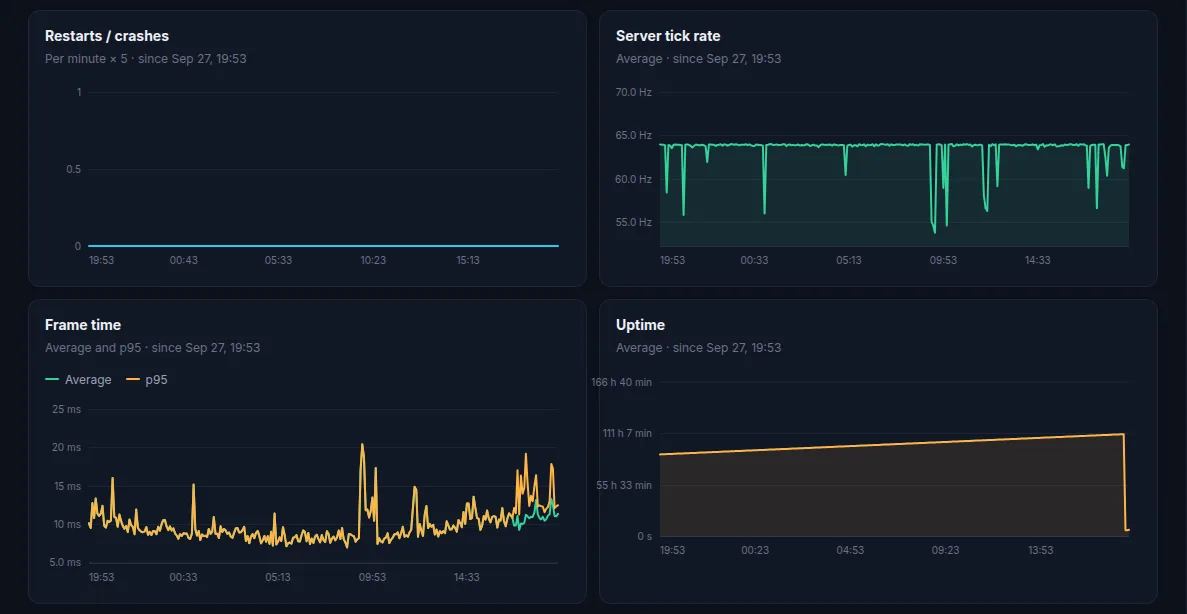
CounterStrikeSharp keeps no per-plugin timings, so on CS2 a spike is split by frame phase, not by plugin: gc (a .NET garbage collection pause, shared by every CounterStrikeSharp plugin), server:entity_think (entity simulation and the game events fired in it), server:frame (CounterStrikeSharp timers and OnTick listeners), and engine:outside_frame (networking, usercmds, host CPU, and listeners that run before ServerStats's). That tells you whether to look at plugins, at GC, or at the host.
TF2, CS:Source and Left 4 Dead 2
For these three, ServerStats uses a small SourceMod plugin plus the ServerStats sidecar, a separate process on the same machine that signs and sends the data (SourcePawn can't do the cryptography itself). The plugin measures every game frame and records:
- Tick time (average and worst frame per window) and tick rate (frames actually run per second).
- Ticks over budget: frames longer than 1.5 times the server's own tick interval, so the check follows your
-tickrate. - Lag spikes over
serverstats_lag_spike_ms(100 ms by default, incfg/sourcemod/serverstats.cfg), at most one per 10 s, with the budget and player count. These are not attributed to a plugin. - Player ping, and on CS:Source packet loss.
The same numbers feed lag spike alerts in Discord on every plan. See the TF2, CS:Source and Left 4 Dead 2 pages for what else each game reports.
No install at all
Any of these servers can also be added in basic mode, which reads the public A2S query port: player count, map, uptime and response time, with nothing installed. Basic mode can't see tick rate; that needs the plugin.
 Counter-Strike 2
 Team Fortress 2
 Counter-Strike: Source
 Left 4 Dead 2
 Garry's Mod