Garry's Mod server lag almost always comes from one of three places: physics (too many unfrozen or colliding props), addon Lua running on every tick (Think and Tick hooks, timers, net messages), or a tick rate set higher than the server can hold. To find the addon responsible, profile the server realm with FProfiler while the lag happens and look at the functions eating the most time. Their file paths name the addon.
Here's how the tick works, what to check first, and how to catch the spike that only happens when you're not watching.
Tick rate and the tick budget
A GMod server simulates the world a fixed number of times per second: its tick rate, set with the -tickrate launch option (default 66). Every tick has a budget:
-tickrate | Budget per tick |
|---|---|
| 16 | 62.5 ms |
| 33 | 30.3 ms |
| 66 (default) | 15.15 ms |
| 100 | 10 ms |
Everything happens in that budget on one thread: physics, entity Think functions, every addon's hook listeners, timers, net messages and the gamemode itself. If the work takes longer, the server can't keep its rate and players feel rubber-banding, delayed gunfire and doors that stick.
Lowering the tick rate is a real option for heavy roleplay servers: -tickrate 33 doubles the budget per tick and halves the work per second. The cost is less precise physics and hit registration. Raising it above 66 only makes sense on a light server whose tick time is already far under the smaller budget.
Check what the server is actually doing with stats in the server console, which prints the server's frame rate and CPU.
The three usual causes
1. Physics and props
Each unfrozen physics object is simulated every tick. Props resting on each other, intersecting props, long constraint chains and big dupes are expensive, and a single player can build something that takes the whole budget. Signs: lag that starts when a particular player builds, or that follows a dupe being pasted.
What helps:
- Limit props per player (
sbox_maxpropsand the othersbox_max*convars in Sandbox-based gamemodes). - Use an anti-prop-spam or anti-crash addon that freezes or ghosts props that collide too much.
- Encourage freezing props, and clean up abandoned builds.
Watch the edict count as well. Source has a hard limit on networked entities, and running out ("no free edicts") crashes the map. Addons that spawn entities and never remove them grow it steadily.
2. Addon hooks, timers and net messages
Every hook.Add("Think", ...) and hook.Add("Tick", ...) listener runs every tick. A listener that loops over every entity with ents.GetAll(), runs ents.FindInSphere for each player, or writes to sql/file each tick adds that cost to every tick. Common offenders:
- HUD-style logic moved to the server by mistake, running every tick.
timer.Createwith a tiny delay doing real work.- Net messages clients can send as often as they like, each triggering a database write or a big table rebuild.
- Big
util.TableToJSON/util.JSONToTablecalls on every save, for every player. - Old addons that were fine with 10 players and scan everything with 60.
3. Tick rate higher than the server can hold
If you run -tickrate 100 or even 66 on a crowded DarkRP server, average tick time may simply exceed the budget. Drop the tick rate or remove load.
Profiling with FProfiler and DBugR
FProfiler (by FPtje, the DarkRP author) is the standard GMod Lua profiler:
- Install it on the server, then run
FProfilerin your game console. Server-side profiling needs superadmin (or theFProfilerpermission in your admin mod). - Set the realm to server and start profiling during the lag.
- Stop after a minute and sort by total time. The file paths of the top functions tell you which addon they belong to. It also highlights individual calls that took unusually long, which is how you find spikes rather than steady cost.
FProfiler times functions, not hooks as such, so a slow function shows up wherever it's called from.
DBugR is an older profiler and performance monitor (dbugr_menu_open) with graphs of client and server performance and a view of expensive hooks and functions. Its own README warns it's heavy and buggy, so use it briefly and remove it afterwards.
Both tools share the same weakness: you have to be there, profiling, while the lag happens.
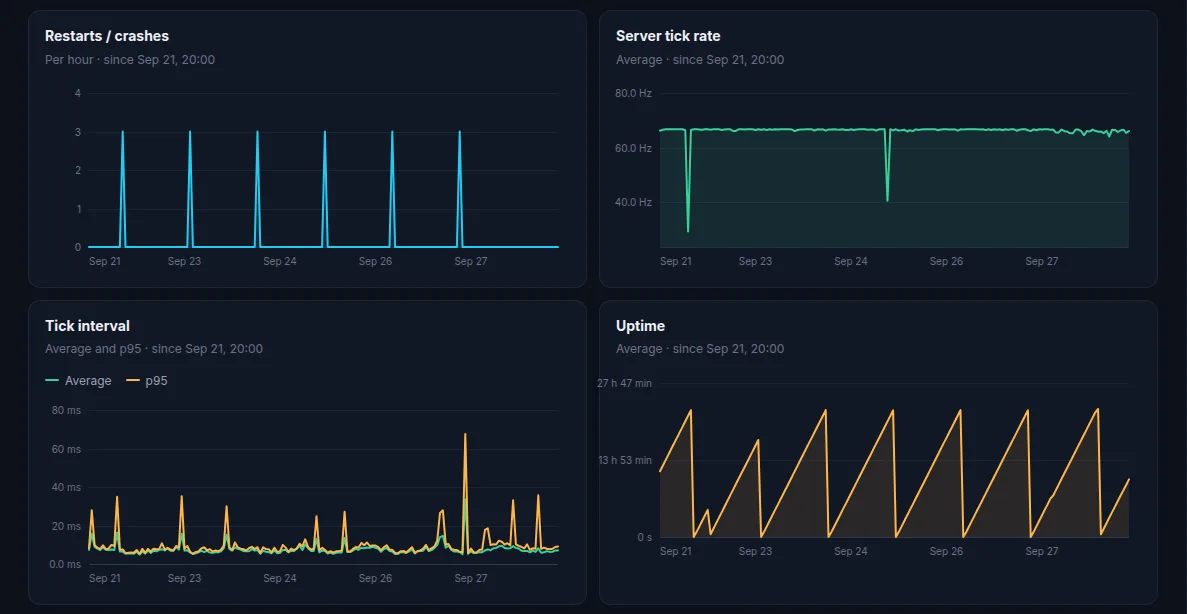
How ServerStats measures GMod lag
The ServerStats Garry's Mod addon is pure server-side Lua (nothing is sent to players). For engine health it records:
- Tick rate (ticks actually run per second) and tick time for every tick, measured against the server's own
engine.TickInterval(), so the budget follows your-tickrate. At the default 66.7 tick the budget is 15 ms. - Lag spikes, at most one per 10 seconds. A spike is either a single tick of at least 100 ms or 5 times the budget, whichever is larger (a hitch), or a whole second averaging more than twice the budget (sustained). Each carries tick time, players and budget.
- Entity count, edict count, total props, Lua memory and the number of mounted addons, plus minutes played per map.
Naming the addon (opt-in)
Set serverstats_profile_hooks 1 in server.cfg and the addon wraps every hook listener with a timer (two SysTime() calls each). When a spike happens, the slowest listener in that tick becomes the cause, for example Think/myaddon_think, with its time in milliseconds and the addon folder it came from. On the test server, a Think hook that blocked for 400 ms was reported as exactly that hook and addon.
It's opt-in because it costs a little on every hook call. Its limits:
- It times hook listeners only. Timers, net receivers, entity
Thinkfunctions and engine time (physics included) aren't attributed. A physics-caused spike shows up as a spike with no slow hook, which is itself a useful answer. - Very hot hooks (collision, movement, animation, voice) aren't wrapped.
- Admin mods that replace the hook library (ULib, used by ULX, and DLib) hide the hook table, so nothing is timed. It fails safe rather than breaking hooks.
Without the convar, spikes are still recorded; their cause just reads "unprofiled".
The addon's own work is budgeted: the collectors average about 3 µs per tick, and background work (encoding, signing, sending) runs in slices of at most 1.5 ms per tick. serverstats status in the server console shows these numbers. Server Lua can't read the host's CPU or memory, so those aren't reported on GMod.
You can send lag spike alerts to Discord on every plan, including Free. For how GMod's tick compares with other Source games, see server tick rate explained.
Checklist
- Check
statsand your-tickrate. Is the server simply over budget? - Does the lag follow a player building or pasting a dupe? Look at props and physics.
- Profile the server realm with FProfiler during the lag; sort by total time.
- Look for Think/Tick hooks and short timers doing heavy work.
- Watch edict and entity counts for leaks.
- Keep tick time and spikes recorded between sessions, so the next spike comes with a time, a player count and, with hook profiling on, a hook name.
 Garry's Mod